
Working time and compliance
The page Compliance & arbejdstid gathers the thresholds heyStaff uses to warn about breaches of working time rules. The defaults follow the Working Time Directive and Danish practice. Only managers have access.
The address is /settings/compliance, and the settings apply to your whole workspace.
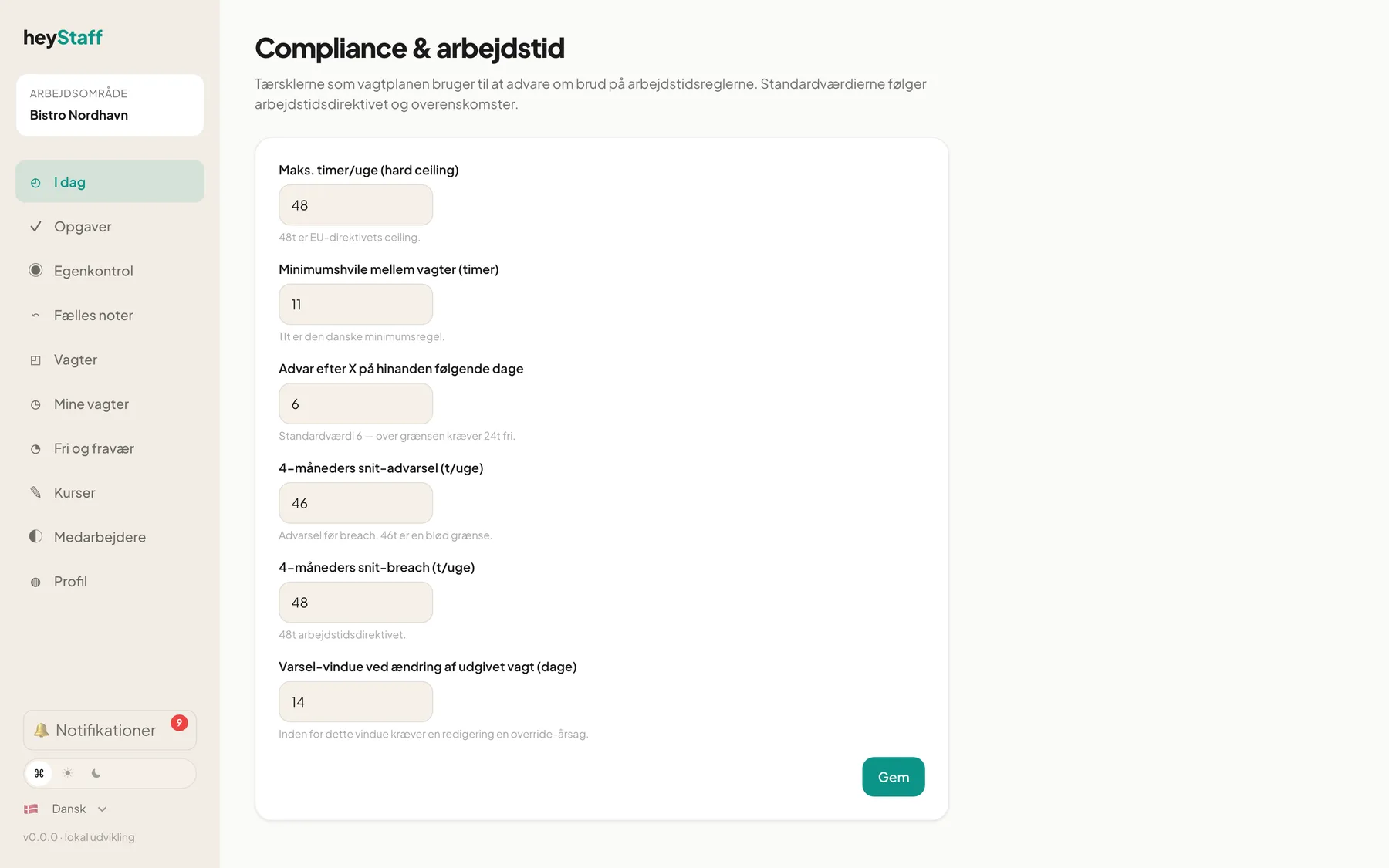
The settings
Section titled “The settings”| Setting | Default | What it controls |
|---|---|---|
| Maks. timer/uge (hard ceiling) (Max hours per week) | 48 | Upper limit for scheduled hours in a week. Above it is a breach. Nearing 90 % of the limit is a warning |
| Minimumshvile mellem vagter (timer) (Minimum rest between shifts) | 11 | Shortest rest between two shifts |
| Advar efter X på hinanden følgende dage (Warn after X consecutive days) | 6 | Number of working days in a row before warning. Over the limit, 24 hours off is required |
| 4-måneders snit-advarsel (t/uge) (4-month average warning) | 46 | Warning when the four-month average approaches the limit |
| 4-måneders snit-breach (t/uge) (4-month average breach) | 48 | Average at which it counts as a breach |
| Varsel-vindue ved ændring af udgivet vagt (dage) (Notice window when changing a published shift) | 14 | See below |
The numbers have fixed ranges. Weekly limits and averages can be set between 20 and 80 hours, rest between 8 and 24 hours, consecutive days between 3 and 14, and notice between 0 and 60 days.
How to change them
Section titled “How to change them”- Open Compliance & arbejdstid.
- Edit the fields you want.
- Click Gem (Save). You see Gemt. next to the button.
Notice window: the effect on the schedule
Section titled “Notice window: the effect on the schedule”Once a shift is published, staff may already have planned their week. A change to a published shift that falls inside the notice window therefore needs a reason. When editing a published shift in the planner you fill in the field Override-årsag (hvis inden for varsel-vindue) (Override reason, if inside the notice window). If the shift is further away than the window, no reason is needed.
With the default of 14 days, changing a shift that starts in 10 days needs a reason. Set the window to 0 to switch the requirement off.
Tip: Keep the rest requirement at 11 hours unless an agreement gives a right to something else. It is the Danish minimum rule.
Important: The thresholds are calculated per employee from the shifts that are planned. In the current version the warnings for rest, consecutive days and the 4-month average are not shown as badges in the planner. The notice window, however, is active when editing published shifts.
Can I set limits higher than 48 hours? The field accepts up to 80, but 48 is the EU limit. Collective agreements may have their own rules.
Why can’t I find the page in the menu?
There is currently no menu item for it. Open the address /settings/compliance directly, or ask support for a shortcut.