
Goods receiving
At goods receiving you check that the goods are in order before they go into storage. The registration takes under a minute, and the waybill is stored as documentation of where the goods came from.
Register a delivery
Section titled “Register a delivery”Goods receiving is a check per event. It does not appear as a fixed task but as a button you press when goods arrive.
- Open Tasks.
- Under Self-checks — new registration click Goods receiving → + New measurement.
- The form opens as a task with the status In progress.
- Fill in the fields (see below).
- Click Save, and confirm with Yes, mark as done.
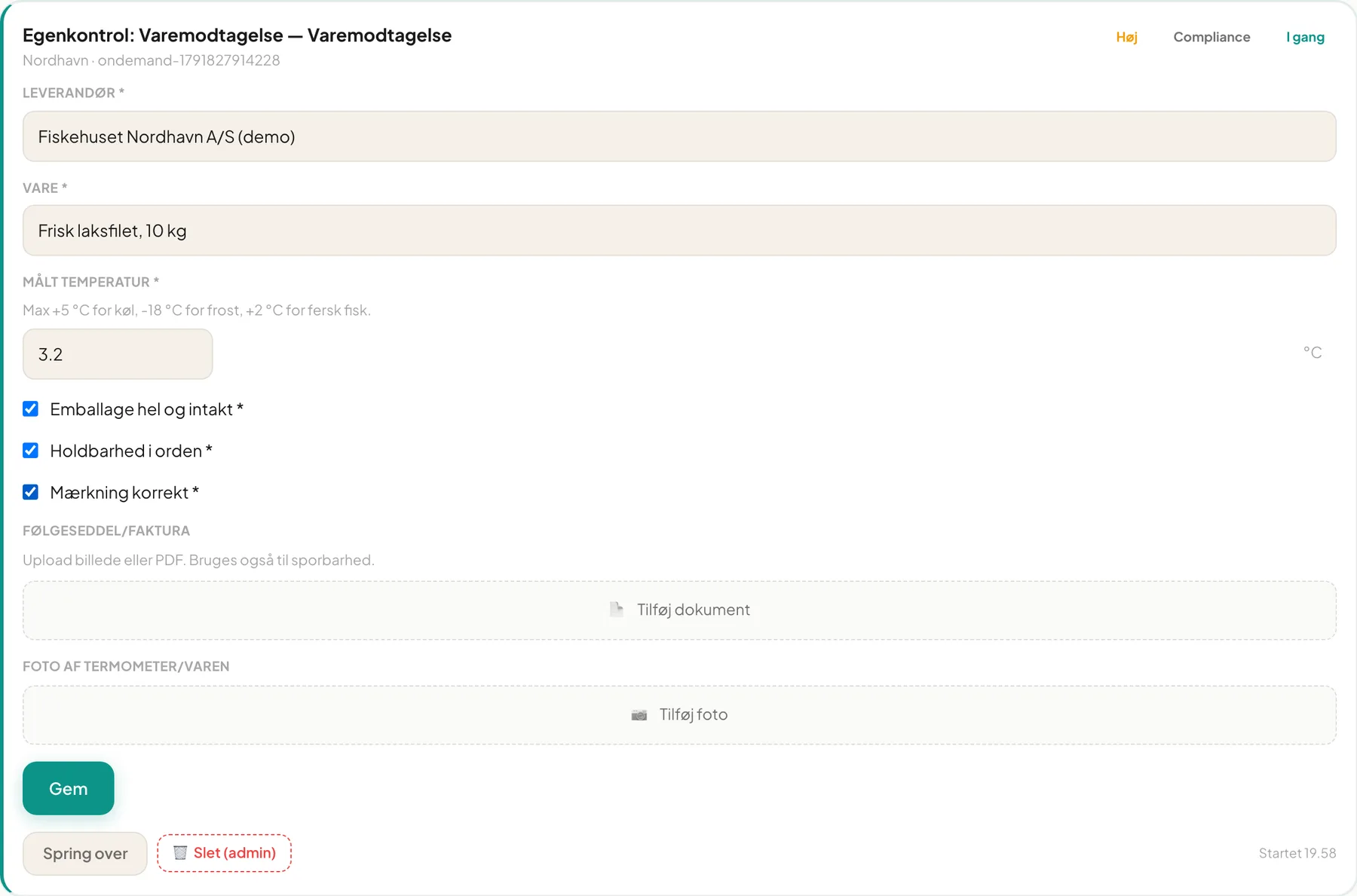
The fields
Section titled “The fields”| Field | What you enter |
|---|---|
| Supplier * | For example “Fiskehuset Nordhavn A/S” |
| Item * | What you are checking, for example “Fresh salmon fillet, 10 kg” |
| Measured temperature * | Temperature of the goods. Limit is max +5 °C chilled, -18 °C frozen and +2 °C fresh fish |
| Packaging intact * | Tick if OK |
| Shelf life within spec * | Tick if OK |
| Labelling correct * | Tick if OK |
| Waybill / invoice | Upload an image or PDF |
| Photo of thermometer/goods | Take a photo |
Fields with * are mandatory.
Photo of the waybill
Section titled “Photo of the waybill”Under Waybill / invoice click Add document and choose an image or a PDF. On a phone you can choose to take the picture of the note straight away. The image is stored with the registration and is also used for traceability.
Under Photo of thermometer/goods click Add photo. On a phone it opens the camera.
Important: At Bistro Nordhavn a photo is required for goods receiving. The manager can switch the requirement on or off on the monitoring schedule (Require photo). When it is on, you cannot save without a photo.
What if the goods are too warm?
Section titled “What if the goods are too warm?”If the temperature is above the limit, a deviation is created automatically when you save. It carries the corrective action: the goods are returned, assessed and used immediately, or assessed and discarded, and the supplier is contacted. Failures must always be documented. See Deviations.
Traceability
Section titled “Traceability”The activity Traceability is mandatory: you must be able to document where food comes from. It has a matching “New measurement” with supplier, goods, quantity and invoice.
Frequently asked questions
Section titled “Frequently asked questions”Do I have to register every delivery? That is decided by your self-check programme. Typically it applies at least to chilled and frozen goods.
I pressed New measurement by mistake. A manager can delete the unfinished task with Delete (admin).
Can I upload several images? Yes, up to three documents and five photos per field.